


This article will thoroughly break down the core mechanics of GA4. We will start with the most fundamental change—GA4 Events—to explore how it redefines our understanding of user behavior. We’ll also dive deep into how GA4 determines traffic sources and how to leverage it for data analysis. After reading this, you will not only understand what GA4 is but also grasp the essential methods for turning data into business insights.
- GA4 is the New Standard for Digital Marketing
- What is GA4? — A Next-Generation Analytics Platform for the Digital Marketing Era
- What are GA4 Events?
- Introduction to GA4 Traffic Sources
- How to Use GA4 for Data Analysis
- Why is Website Data from GA4 Not Enough on Its Own?
- CDP is the Next Step to Unleash the Potential of GA4 Data
- Action Now
GA4 is the New Standard for Digital Marketing
In the world of digital marketing, data is no longer just noise that overwhelms you; it’s the only signal that lets you hear your customers’ true voices. From luxury brand flagships in Tsim Sha Tsui to online electronic parts shops in Sham Shui Po, almost every business has moved online. However, with the official retirement of the long-serving Universal Analytics (UA), the full-scale launch of Google Analytics 4 (GA4) is not just a tool upgrade—it’s a major test for all marketers. Many business owners and marketing teams are filled with questions: What is GA4? How is it different from the old version? And most importantly, how can it help us navigate this fiercely competitive digital landscape to find truly valuable customers?
What is GA4? — A Next-Generation Analytics Platform for the Digital Marketing Era
Frankly, even seasoned professionals accustomed to UA and GA might not be clear on what GA4 is at first glance. GA4 (Google Analytics 4) is not merely an update to the old UA; it’s more like a completely redesigned “data operating system” built by Google to address the future of the digital world. Its creation stems from two core shifts of our time: first, the user journey is no longer confined to a single website but seamlessly moves between websites and mobile apps; second, with growing global emphasis on user privacy, traditional tracking methods reliant on third-party cookies are coming to an end.
Unlike the old UA, which was centered around “Sessions,” the core of GA4 is the “User” and the “Event.” This fundamental shift means GA4 no longer views users as a series of “visits” but as unique individuals, recording every meaningful action (i.e., “event”) they complete within a website or app. This user-centric data analysis model in GA4 allows us to understand the entire customer lifecycle journey in a more three-dimensional and coherent way.

To give you a clearer picture of what GA4 is and how it differs from the old UA, here is a quick comparison table:
| Feature | Universal Analytics (Old UA) | Google Analytics 4 (GA4) |
|---|---|---|
| Core Model | Session-centric | User- and Event-centric |
| Data Model | Primarily based on “Pageviews” | Everything is an event; all interactions are events |
| Tracking Scope | Primarily for Websites | Natively integrates Web + App |
| User Interaction Metric | Bounce Rate | Engagement Rate, a more positive metric |
| Cross-Device Tracking | Relatively difficult | Easier to achieve through methods like Google Signals |
| Data Retention | Longer default, can be set to permanent | Default 2 months, max 14 months, encourages BigQuery integration |
For today’s brands and online stores, using GA4 is no longer an option but a necessity. In this “customer-is-king” era, whoever understands their customers more deeply wins the market. The cross-platform data integration and flexible GA4 event tracking mechanism it provides are the crucial first steps for businesses to gain a complete view of their users and achieve precision marketing.
What are GA4 Events?
To truly master what GA4 is, one must first understand the core concept of “Events.” In the world of old UA, our main concern was “Pageviews,” while other interactions (like downloads or video plays) required additional “Event” setup for tracking. But in the world of GA4, everything is an event.
This means that from a user’s first page view (page_view), to scrolling down a page (scroll), to clicking an outbound link (click), and even completing a purchase (purchase), GA4 records all these interactions as individual GA4 events. The advantage of this mechanism is its extreme flexibility and uniformity. It makes GA4’s data analysis more focused on actual user behavior rather than just page load counts. GA4 categorizes events primarily into the following four types:
1. Automatically Collected Events
Once you install the GA4 tracking code, the system automatically starts collecting basic events without any additional setup from you. They are the foundation of your GA4 analysis and cover the most common user interactions. For example:
- session_start: Triggered when a user begins a new session.
- first_visit: Triggered when a user visits your website or app for the first time.
- user_engagement: Triggered when a user stays on your site in the foreground for a certain period or has a conversion event, used to measure user activity.
2. Enhanced Measurement Events
Enhanced measurement events are a major advancement in GA4. With just a single click in the settings to enable the “Enhanced measurement” feature, GA4 will automatically track more valuable interaction events for you, significantly lowering the technical barrier. These events are extremely useful for most websites and include:
- Scrolls: Triggered when a user scrolls to the bottom (90%) of a page.
- Outbound clicks: Triggered when a user clicks a link that leads away from your site.
- Site search: Triggered when a user uses your site’s search function.
- Video engagement: Triggered when a user starts, progresses through, or completes an embedded YouTube video.
- File downloads: Triggered when a user clicks a link to download a file.
3. Recommended Events
Google has predefined a series of “recommended event” names and parameters based on the common needs of different industries. Although these events require manual setup, following Google’s recommended standards ensures your data structure is standardized and helps leverage Google’s machine learning features in the future. For example, for e-commerce sites, Google recommends using GA4 event names like add_to_cart, begin_checkout, and purchase.
4. Custom Events
When the above three types of events cannot meet your unique tracking needs, “custom events” come into play. You have complete freedom to name and define events that are specific to your business. For example, a real estate website might want to track user clicks on a “Book a Viewing” button. In this case, they could create a custom GA4 event named book_a_visit. This high degree of customization ensures that your GA4 data analysis can be closely aligned with your business objectives.
Introduction to GA4 Traffic Sources
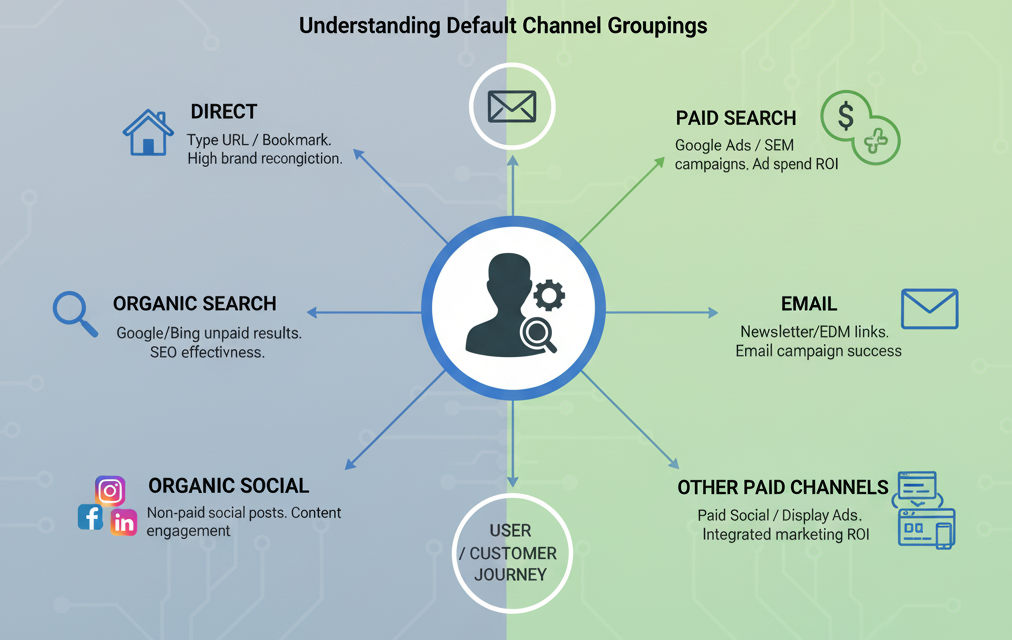
Understanding “where customers come from” is the starting point of all marketing strategies. GA4’s definition of traffic sources is more intelligent and detailed than before. GA4 automatically attributes traffic to different “Default Channel Groupings,” allowing you to see the performance of various channels more clearly. Here are some of the most common GA4 traffic source types:
Direct
When GA4 cannot identify the source of a user, it categorizes it as “Direct” traffic. This usually happens when a user types your URL directly into the browser or visits via a bookmark. A high proportion of direct traffic often indicates that your brand has a certain level of recognition and a loyal user base.
Organic Search
This refers to users who click through to your website from the “non-ad” search results of search engines like Google or Bing. This is classified by GA4 as an Organic Search traffic source and is the most critical indicator for measuring the effectiveness of your SEO (Search Engine Optimization). Continuously optimizing your website content to improve search engine rankings is the key to acquiring high-quality organic search traffic.
Organic Social
“Non-paid” traffic from social media platforms like Facebook, Instagram, and LinkedIn. For example, a user clicks on a blog post link you shared on your Facebook page. This reflects whether your social media content strategy is successful in effectively engaging your followers with your brand.
Referral
When a user comes to your site by clicking a link on another website (that is not a major search engine or social platform), it falls under the Referral traffic source in GA4. For example, a well-known blog recommends your product in an article and links to your product page. This is an important metric for measuring your brand’s online reputation and influence.
Paid Search
Click traffic from search engine ads, such as Google Ads. This is a direct indicator for measuring the performance of your SEM (Search Engine Marketing) advertising campaigns, letting you know exactly how many visitors each dollar of ad spend brings.
Traffic generated from users clicking on links in your newsletters or EDMs. This is key to evaluating the success of your email marketing campaigns, helping you understand which content or offers are most effective at bringing subscribers back to your site.
Other Paid Channels (Paid Social, Display, etc.)
This covers all other paid advertising channels, such as Facebook/Instagram ads (Paid Social), banner ads (Display), and more. GA4 clearly distinguishes these channels, which helps you conduct comprehensive GA4 data analysis to evaluate the ROI of various paid channels in your integrated marketing campaigns.
Understanding these GA4 traffic sources is crucial for deploying and analyzing your marketing plans. It helps you answer a series of core business questions: Which channel brings the most valuable customers? Where should we allocate our advertising budget for the next quarter? Is our SEO strategy working? Only by clearly grasping traffic sources with GA4 can your marketing decisions be truly data-driven.
How to Use GA4 for Data Analysis
Collecting data is just the first step; the real value lies in the analysis. GA4 provides more powerful and flexible analysis tools than ever before. To effectively use GA4 for data analysis, you first need to understand a few core metrics:
User Behavior
- New users: The number of users who visited your website or app for the first time.
- Unique users / Active users: The total number of unique users who had an interaction with your website or app within a specified date range. This is a core metric in GA4 data analysis for measuring the overall reach and activity of your platform.
Engagement
- Average engagement time: The average length of time your site was in the foreground in a user’s browser. This metric replaces the old “Average Session Duration” and better reflects whether users are truly interacting with your content.
- Engaged sessions: Sessions that lasted longer than 10 seconds, had at least one conversion event, or had at least 2 pageviews.
- Engagement rate: The percentage of “Engaged sessions” out of “Total sessions.” It replaces the old “Bounce Rate” and is a more positive indicator that reflects content quality.
Conversion Performance
- Conversions: The total number of times users completed a GA4 event that is valuable to your business (e.g., purchase or generate_lead).
- Conversion rate: The percentage of users or sessions that result in a conversion. This is the ultimate metric for measuring the achievement of your business goals.
Besides the standard reports, the “Explore” feature is where GA4’s power truly lies. Here, you can act like a data analyst, freely combining dimensions and metrics to build custom reports. For example, you can create a “Funnel exploration” report to deeply analyze user conversion and drop-off at each step from browsing a product to adding it to the cart and completing the purchase. Or, you can build a “Path exploration” report to understand the most common browsing paths users take within your site. These in-depth GA4 data analyses can reveal user behavior insights that standard reports cannot.GA4 Practical Application Examples
E-commerce Website
A local fashion e-commerce store can use GA4 events to track view_item, add_to_cart, and purchase. By creating a “Funnel exploration” report, the store owner can clearly see how many users added items to the cart after viewing them, and how many abandoned the purchase after adding to the cart. If the drop-off rate from “add to cart” to “purchase” is particularly high, it might indicate that the checkout process is too complicated or the shipping fees are unreasonable. Furthermore, by combining this with GA4 traffic source data, the owner can conduct deeper GA4 analysis to compare which channel, Instagram ads or organic search, has a higher final purchase conversion rate, thereby optimizing ad budget allocation.
Content Website
A blog that shares local hiking trails can use “Enhanced measurement events” like “Scroll” and “Video engagement” to measure reader engagement with articles. If a particular article about “Tai Tung Shan” shows that 90% of readers scrolled to the bottom of the page and watched the entire embedded trail video, this is a strong signal that this type of topic is very popular. Based on the insights from this GA4 data analysis, the site’s editor can plan more in-depth content about hiking trails on the outlying islands to cater to reader interests and improve the site’s overall engagement rate.
Why is Website Data from GA4 Not Enough on Its Own?
GA4 is undoubtedly a cornerstone of digital marketing, but to build a true competitive advantage, relying solely on GA4 data is not enough. There are two main reasons:
- Short Data Retention Period: GA4’s user-level data is retained for a maximum of 14 months. For businesses that need to conduct long-term customer lifetime value analysis, this is a critical limitation.
- Data Silo Problem: GA4 primarily records “anonymous” user behavior within your website or app. It cannot easily link these behaviors directly with your “identified” customer data on other platforms (such as offline POS systems, CRM, or Facebook Ads Manager).
CDP is the Next Step to Unleash the Potential of GA4 Data
GA4 provides you with extremely valuable “raw data” that tells you “what happened.” But the true value of data lies in its effective application to drive the “next action.” Through a CDP platform, you can match the high-potential anonymous users discovered in GA4 with your known customer profiles in your CRM or other systems, thereby building a complete 360-degree customer view. With this profile, you can conduct more precise remarketing or send truly personalized messages they are interested in via channels like email or WhatsApp, effectively turning data insights into business opportunities.
DAL by Master Concept’s Customer Data Platform (CDP) solution provides brands and online stores with a comprehensive data integration tool. We can help you seamlessly integrate the precious data collected from GA4 into your customer database, breaking down data silos and transforming it into a core asset that drives business growth. Contact our experts today to learn how to start with GA4 data analysis and move towards true data-driven marketing.
GET IN TOUCH


![[Free Webinar] Road to COP17: Unifying Enterprise Data with Planetary-Scale Geospatial AI](https://masterconcept.ai/wp-content/uploads/2026/09/Webinar-261007-Unifying-Enterprise-Data-with-Planetary-Scale-Geospatial-AI-_1280x720px-scaled.png)