


In the Google Workspace ecosystem, Google Meet is deeply integrated with Google Calendar. When creating an event in the Google Calendar, you can add a Google Meet link with Meet ID, allowing invited participants to join the online meeting directly through the event. However Managing multiple Google Meet sessions, each with unique access codes can be challenging. A single, consistent Google Meet link for your regular team sessions or weekly gatherings, will be convenient. This article provides a comprehensive guide on creating repeated Google Meet links and maintaining consistent access for all virtual meetings.
Step-by-step to create repeated Google Meet Links
1. Go to Google Calendar, click “Create” in the top left corner, and then click “Event.”

2. Click the “Add Google Meet video conferencing” button.

3. Click on the time slot to set the event time, and then click the “Does not repeat” dropdown menu and set the event recurrence.
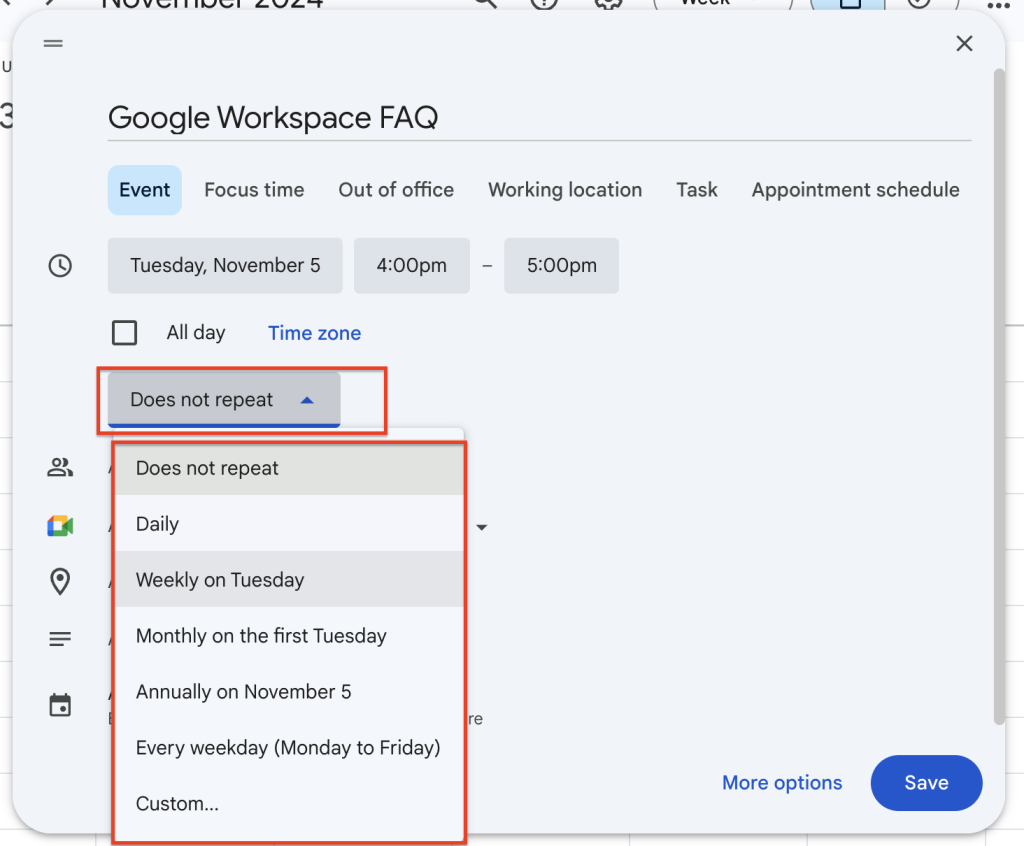
4. Click “Save” in the bottom right corner to complete the setup. All recurring events are not with the same Google Meet links and ID.

5. Using the “Copy event” function will also maintain the same Google Meet links and ID.

Conclusion
Mastering reusable Google Meet links is a game-changer for anyone who regularly hosts or participates in online meetings. By leveraging the power of Google Calendar integration, you can streamline your workflow, eliminate the hassle of constantly generating new codes, and create a more consistent and efficient online meeting experience. So, ditch the link chaos and embrace the simplicity of reusable links – your future self will thank you! Contact us today to learn more about optimizing your Google Workspace experience.
Know more about Google Workspace
Learn How To Reclaim Your Google Workspace Domain
Everything You Need to Know About Google Gemini




![[Free Webinar] Road to COP17: Unifying Enterprise Data with Planetary-Scale Geospatial AI](https://masterconcept.ai/wp-content/uploads/2026/09/Webinar-261007-Unifying-Enterprise-Data-with-Planetary-Scale-Geospatial-AI-_1280x720px-scaled.png)