


Many Singapore-based technology companies rely heavily on Jira for engineering execution. It remains the standard tool for sprint planning, backlog management and issue tracking.
However, as organisations grow and operate across marketing, product, operations and regional leadership teams, Jira alone often cannot support cross-functional collaboration at scale. This is why searches such as Asana Jira integration and Jira task sync continue to increase in Singapore. Companies are not looking to replace Jira. They are looking to extend it.
The real question is how to connect engineering execution with business visibility without disrupting existing workflows.
This guide explains how Asana integrates with Jira, how task synchronization works and how Singapore organisations can design a scalable collaboration structure.
Why Singapore Companies Are Adding Asana to Jira
Why Singapore Companies Are Adding Asana to Jira
In Singapore, many organisations operate as regional headquarters for Southeast Asia. Projects often involve multiple stakeholders, distributed teams and executive reporting requirements.
Engineering teams prefer to stay inside Jira. Marketing and operations teams need structured project views. Leadership needs portfolio-level visibility.
When all teams are forced into Jira, non-technical stakeholders struggle to navigate issues and workflows. When teams operate separately, status updates become manual and inconsistent.
Asana provides a collaboration layer that connects these groups without forcing engineering teams to change tools.
What Can Be Synced Between Asana and Jira?
With native Jira Cloud integration, organisations can configure:
- Creation of Jira issues from Asana tasks
- Two-way status updates
- Assignee synchronization
- Priority mapping
- Due date alignment
- Direct issue linking between systems
Best practice in Singapore enterprises is to sync only critical workflow fields. Over synchronisation often creates unnecessary complexity across departments.
Step-by-Step: How to Set Up Asana–Jira Integration
Although the setup process is technically straightforward, successful implementation depends on workflow clarity.
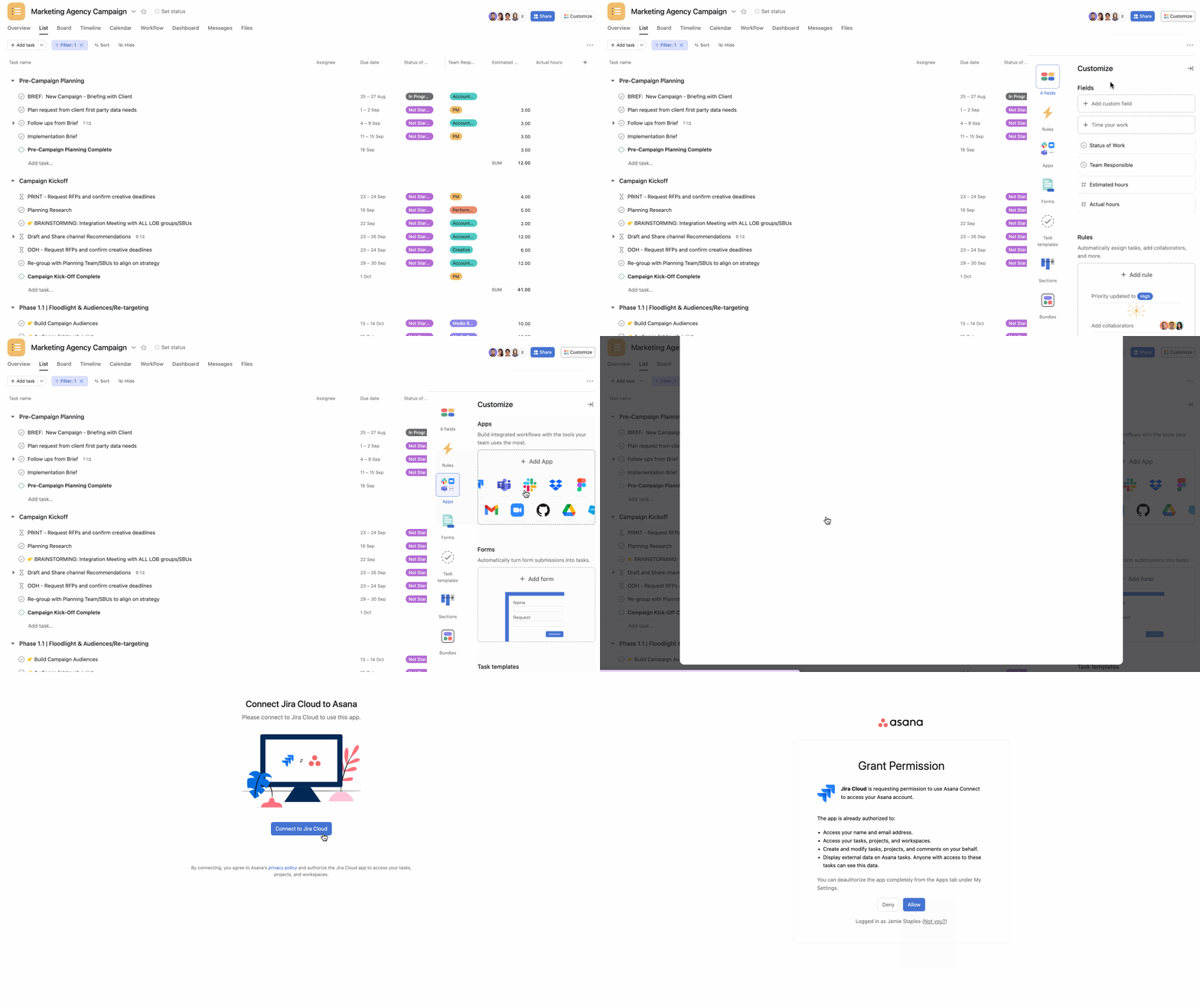
Step 1: Connect Jira in Asana
Inside your Asana project:
- Click Customize
- Select Apps
- Search for Jira Cloud
- Authorize your Jira account
Step 2: Create or Link a Jira Issue from Asana
Within any Asana task, select Add to Jira, choose the relevant Jira project and issue type, and create the issue.
The task will now display a direct Jira link.
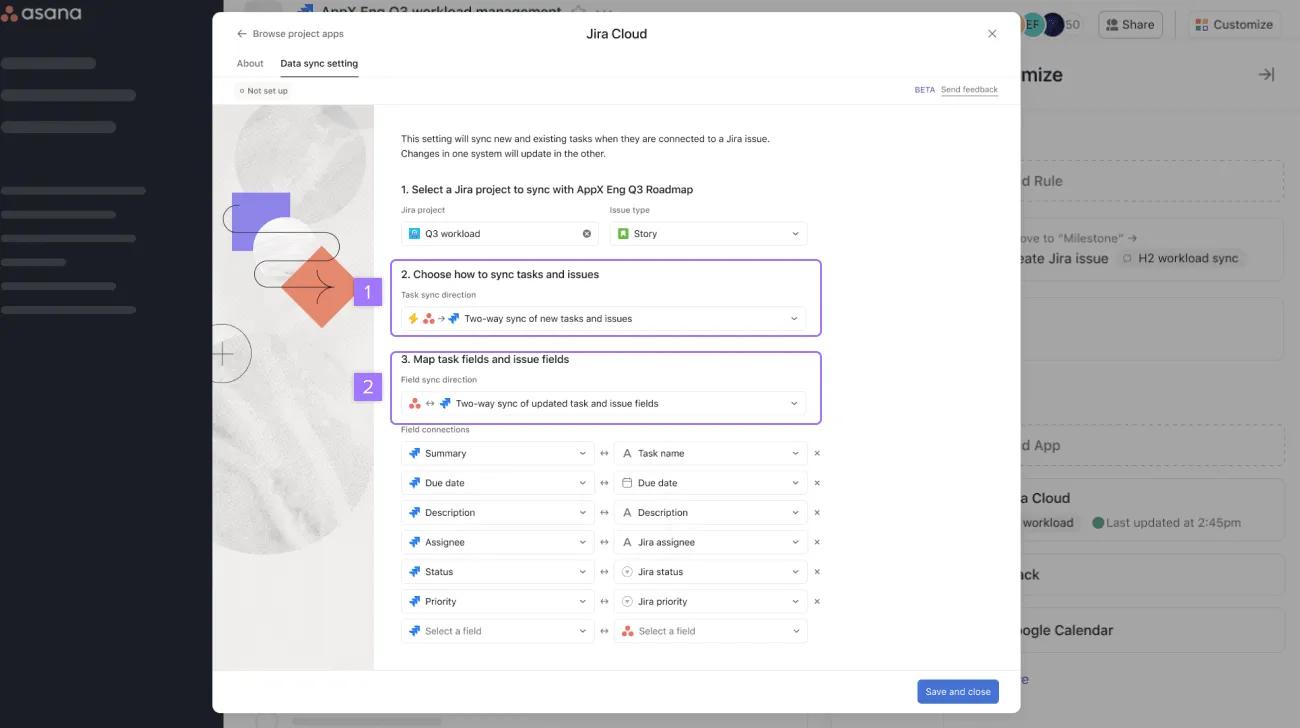
Step 3: Configure Sync Rules (Critical Step)
This is where many integrations fail.
Organizations must define:
- Whether to enable two-way status sync
- How Jira statuses map to Asana sections
- Whether assignees sync automatically
- Which fields should remain system-specific
Clear mapping rules prevent duplicated tasks and inconsistent statuses.
Step 4: Test End-to-End Sync
Run a full workflow test:
- Update status in Asana → verify Jira reflects change
- Update status in Jira → confirm Asana updates automatically
Testing ensures the integration works under real project conditions.
Two Common Singapore Use Cases
Use Case 1: Regional Product Launch Coordination
A Singapore regional HQ is launching a new feature across Southeast Asia. Marketing plans campaigns in Asana while engineering tracks development in Jira.
Marketing creates Jira issues directly from Asana tasks. When engineers complete the issue, Asana updates automatically.
Regional leadership gains clear visibility without needing access to detailed engineering workflows.
Use Case 2: Executive Portfolio Reporting
Product managers manage epics and sprints inside Jira. Senior leadership wants to see Q4 priorities, launch timelines and resource allocation across departments.
By syncing Jira epics into Asana milestones and leveraging Portfolio views, executives receive structured reporting without affecting engineering processes.
Why Do Some Asana–Jira Integrations Fail?
In Singapore enterprises, integration failures are rarely technical.
Common causes include:
- No defined ownership of task creation
- Unclear status mapping
- Overly complex field synchronization
- Lack of cross-team alignment
Successful Asana Jira integration requires workflow design and governance, not just system connection.
Is Asana Replacing Jira?
No.
Asana is not designed to replace Jira’s engineering capabilities. Instead, it complements Jira by improving cross-functional collaboration, structured planning and executive visibility.
For growing Singapore organisations managing regional operations, this layered model provides both technical depth and business clarity.
Who Should Consider Asana–Jira Integration?
Organisations in Singapore should evaluate integration if they:
- Already use Jira but struggle with non-technical adoption
- Run frequent regional projects or product launches
- Require structured executive reporting
- Need better alignment between engineering and business teams
Book a One-on-One Consultation
If your organisation in Singapore is evaluating Asana Jira integration, task synchronization or cross-functional workflow improvement, our consultants can assess your current setup and recommend a scalable integration framework.
Book a one-on-one consultation to explore how Asana can integrate effectively with Jira in your organisation.
Frequently Asked Questions (FAQ)
Can Asana integrate with Jira in Singapore?
Yes. Asana provides native Jira Cloud integration that allows Singapore-based teams to connect tasks and issues across both systems. Once configured, updates can sync automatically between platforms.
Does Asana support two-way Jira task sync?
Yes. Asana supports two-way synchronisation of task status, assignees, priority and due dates. However, organizations should define clear status mapping rules before enabling full sync.
Is Asana a replacement for Jira?
No. Asana does not replace Jira’s sprint and engineering management capabilities. It complements Jira by providing cross-functional planning and executive visibility.
Do engineers need to use Asana after integration?
No. Engineering teams can continue working entirely within Jira. Asana acts as a collaboration and reporting layer for marketing, operations and leadership teams.
Is Asana Jira integration difficult to implement?
The technical setup is relatively simple. However, successful implementation requires workflow design, status mapping and cross-team governance.
What types of Singapore companies benefit most from Asana Jira integration?
Companies operating as regional headquarters, technology firms managing product launches and organizations requiring executive portfolio reporting typically benefit the most.
Does integration require additional licensing?
Licensing depends on your existing Asana and Jira subscription plans. It is recommended to review plan features and permissions before deployment.


![[banner] Beyond the Chatbot Arena hype, what matters for Enterprise AI](https://masterconcept.ai/wp-content/uploads/2025/08/banner-Chatbot-Arena-x-Freshworks-AI-agent-blog_Master-Concept.png)

![[Free Webinar] Road to COP17: Unifying Enterprise Data with Planetary-Scale Geospatial AI](https://masterconcept.ai/wp-content/uploads/2026/09/Webinar-261007-Unifying-Enterprise-Data-with-Planetary-Scale-Geospatial-AI-_1280x720px-scaled.png)