


Many businesses need to meet customer demands for immediate feedback. Gmail auto-reply features ensure prompt automated responses, providing basic information on products, prices, and deliveries. This feature guarantees consistency and accuracy, especially for businesses handling high volumes of inquiries, where manual replies may lead to inconsistencies or missed details. By using pre-set templates, response efficiency and accuracy are significantly enhanced. Most importantly, auto-reply features improve customer satisfaction, ensuring quick responses and fostering trust and loyalty.
How to Set Up Auto-reply for Everyone

Step 1: Open Gmail on your computer, click “Setting” > “See all settings“.
Step 2: Under the “General” tab, go to the “Vacation responder” section.
- Select Vacation responder, and fill in the date range, subject, and message.
- Optional: To send the reply to your contacts only, under the message, check the box.
- At the bottom of the page, click “Save Changes”.
- Then, your auto-reply is done!

Tips:
- If you have a signature, it shows below the reply.
- When your vacation responder is on, a banner shows across the top of your inbox. To turn it off, click “End Now“.
How to Set Up Auto-Replies for Specific People or Group
Step 1: Go to “Setting”, find “Advanced” > “Templates”, then select “Enable”, and now your turn on reply by templates function.
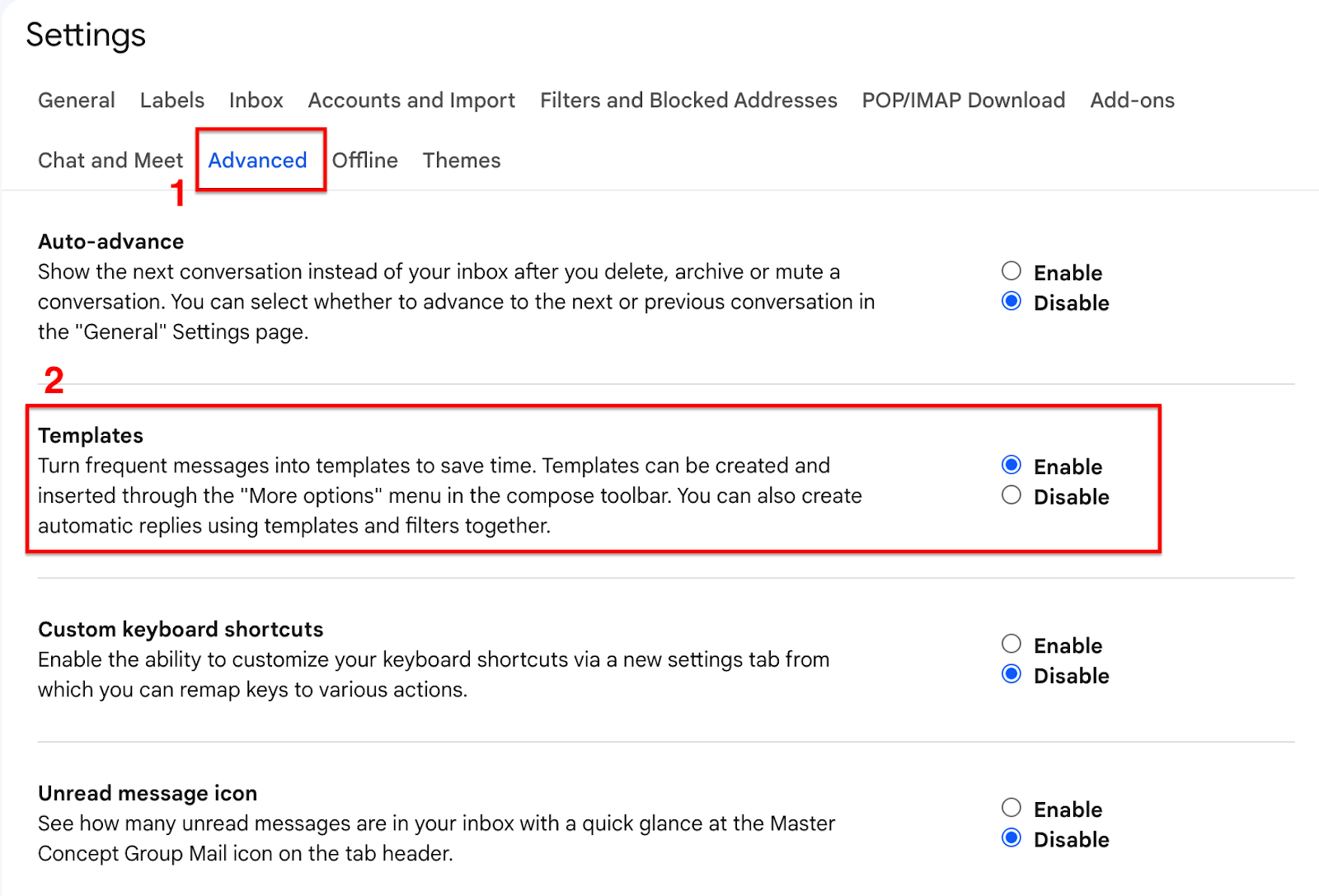
Step 2: Back to the Gmail main page, click “Compose”, then select more > “Templates” > “Save draft as template” > “Save as new template”.

Step 3: You also select which template to send to a specific person or group. Find “Filter” logo in the search bar and then type the people or domain (group) you want to set, select “Send template” and click “Create Filter.”

Tips: Email auto-replies can also be configured based on domains. If the sender’s address includes a specific domain, then all emails sent from accounts under that domain will receive an automatic reply.
About Master Concept
Master Concept is the first Google Cloud Premier Partner in Hong Kong and an outstanding Google Workspace (G Suite) reseller in the Asia Pacific region. Master Concept was awarded the Google Cloud – Work Transformation – Best Partner of the Year Award, and its achievements in assisting enterprises in digital transformation are highly recognized.
Master Concept has assisted over a thousand enterprises across various sizes and industries to introduce Google Workspace to their business. It provides consulting, technology introduction, data migration, and after-sales training to assist enterprises in their journey to the cloud.
Know more about Google Workspace
Learn How To Reclaim Your Google Workspace Domain
Everything You Need to Know About Google Gemini
【Free Trial】Speed up your work with Duet AI
Work Smart: Try new features on Gmail
Try Duet AI Now for Google Workspace now: Modern Workplace Revolution


![[Free Webinar] Road to COP17: Unifying Enterprise Data with Planetary-Scale Geospatial AI](https://masterconcept.ai/wp-content/uploads/2026/09/Webinar-261007-Unifying-Enterprise-Data-with-Planetary-Scale-Geospatial-AI-_1280x720px-scaled.png)