在深入探討了 Google Cloud Platform 的 Security Command Center (SCC) 的各個版本後,我們現在來到了一個關鍵問題:如何為您的企業選擇最合適的 SCC 版本?本文將為您詳細解析 SCC 的 Standard、Premium 和 Enterprise 三個版本的價格結構、功能差異和啟用方式。從 Standard 版本到功能強大的 Enterprise 版本,東東老師將為您提供清晰的比較,幫助您根據企業規模、安全需求和預算做出明智的選擇。
Security Command Center 不同版本的價格說明
1. SCC Standard 版本價格
免費,其中 Data Security Findings 是屬於敏感資料保護的功能,是另外計費的,不在免費範圍。
2. SCC Premium 版本價格
這裡有分成 Project Level 和 Organization Level 的不同價格,整理如下:
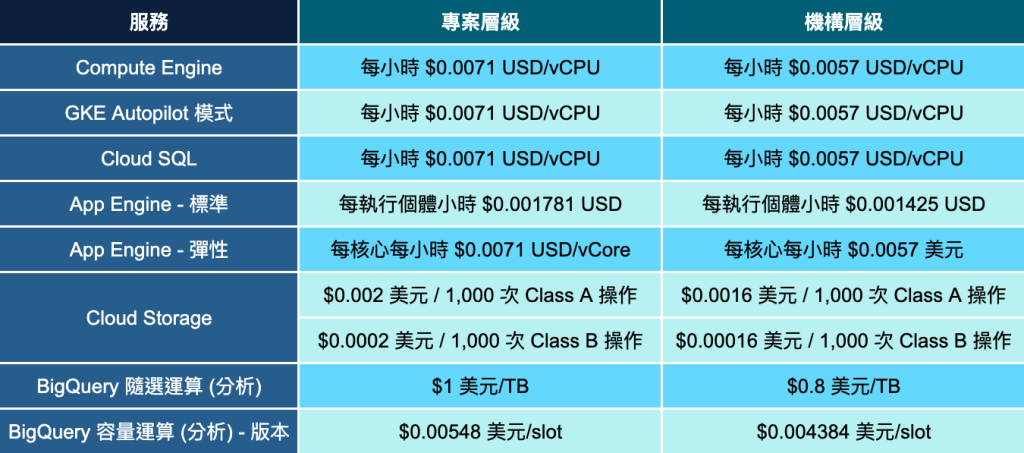
資料來源:東東老師自行整理
3. SCC Enterprise 版本價格
這個版本的會價格取決於資產的數量,主要重點如下:
- 訂閱最少一年。
- 每個資產價格是 199 到 309 美元之間,取決於你的資產數量和訂閱長度。我建議你就當做每個資產都是 309 美元,除非你的資產數量夠大,或是訂閱年份夠長。
- 你可以買不同數量的資產,可以隨時用,但年底沒用完的話,不能留到下一年。
- 訂閱價格 = 資產數量 x 每個資產的價格,當月費用在下個月付費。
- 如果使用超過原本購買的數量,就要付超用費。
- 不管你購買多少資產,只要是符合的資源,都會計費。
- 最低費用是一年 15,000 美元。
此還可能還有其他間接或衍生的費用,完整的費用說明可以參考這份文件,建議還是直接聯絡代理商,與你詳談需求後,得更較精準的報價。
Security Command Center 不同版本的啟用方式
你可以在 Project Level 或 Org Level 啟用,為了較全面的防護,建立還是在 Org Level 啟用。首先在 Console 上將環境切換到 Org Level,點擊 Security => Risk Management 會看到首次啟用的畫面,這時點擊 GET SECURITY COMMAND CENTER
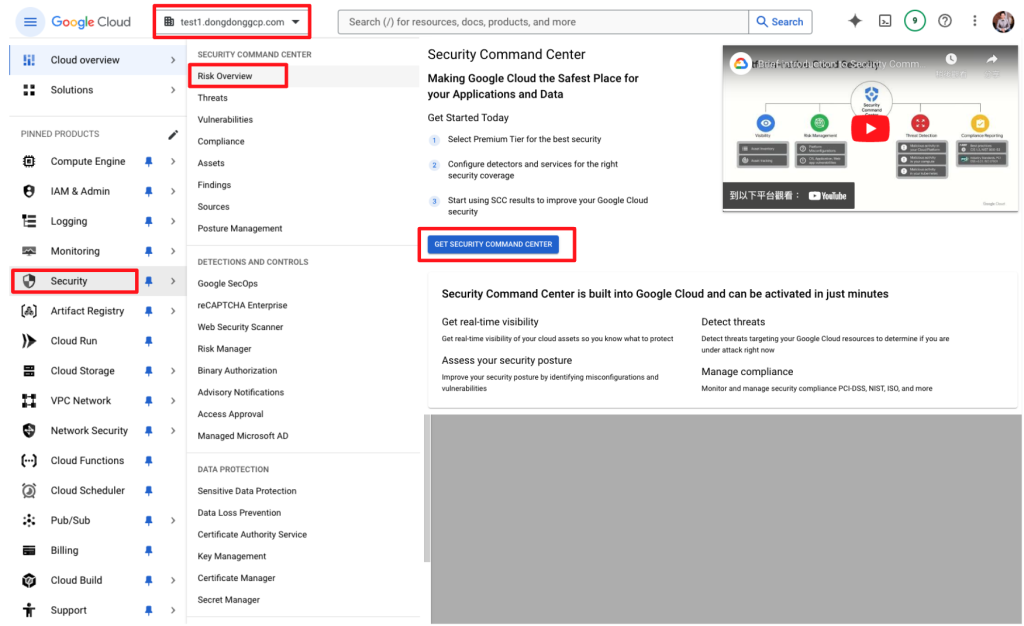
資料來源:擷圖自 GCP Console
接下來的步驟一,會給你三個版本的比較,Standard 和 Premium 版本可以直接選擇,而 Enterprise 需要點擊 Contact us 聯絡 Google,或是聯絡代理商來協助啟用。步驟二會看先到它詢問你是否要啟用 Data Residency,它會將 SCC 發現到的威脅儲存在你指定的地方,選項包含全球、美國和歐盟。 要注意的是,如果沒啟用,之後就沒辦法回來啟用了,它預設儲存位置就是全球。再來如果你啟用了,以後也無法停用,或變更儲存位置。

資料來源:擷圖自 GCP Console
再往下看,有些 Premium 功能已經預設啟用,你可以視需求決定各個功能的開關設定。
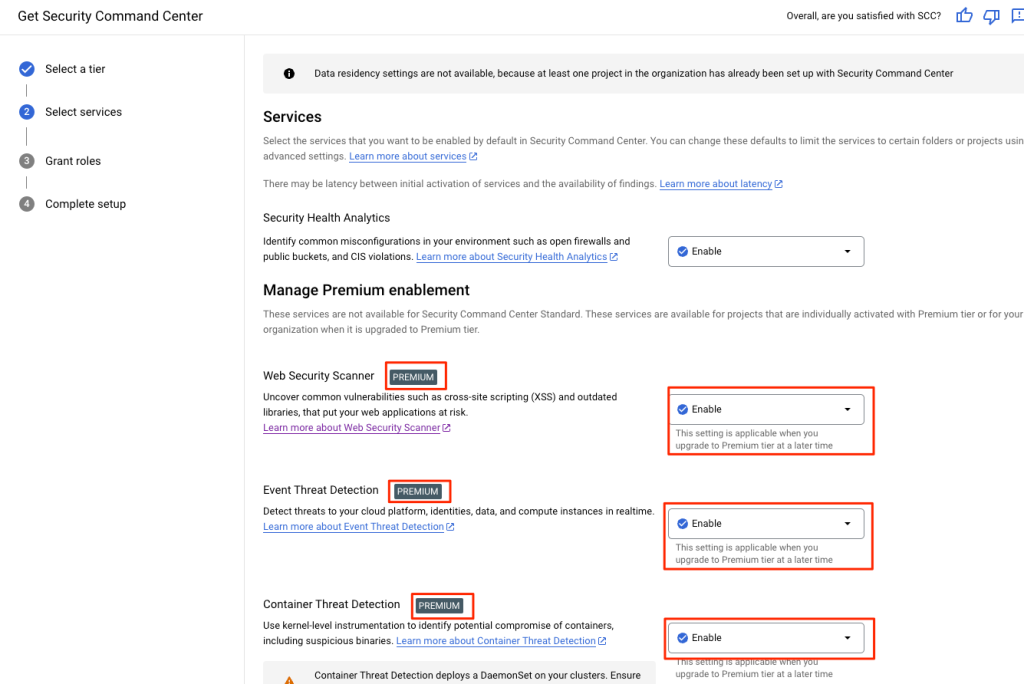
資料來源:擷圖自 GCP Console
第三步會看到,SCC 需要你主動授權,讓它可以去掃描各項資源,除非你對權限非常熟悉,不然就依照系統的建議,自動授權即可。
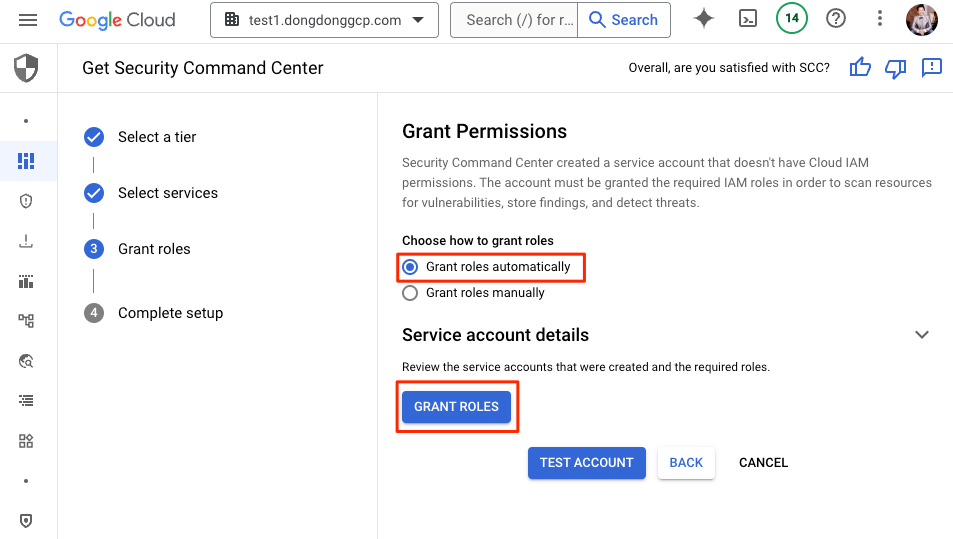
資料來源:擷圖自 GCP Console
授權完成會看到相關資訊,沒問題再按 NEXT。
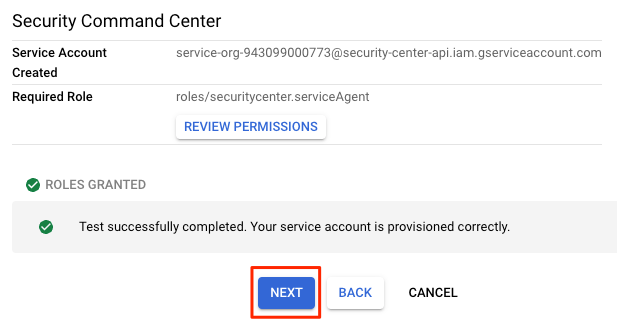
資料來源:擷圖自 GCP Console
第四步就是告訴你設定完成,按下 Finish 即可。
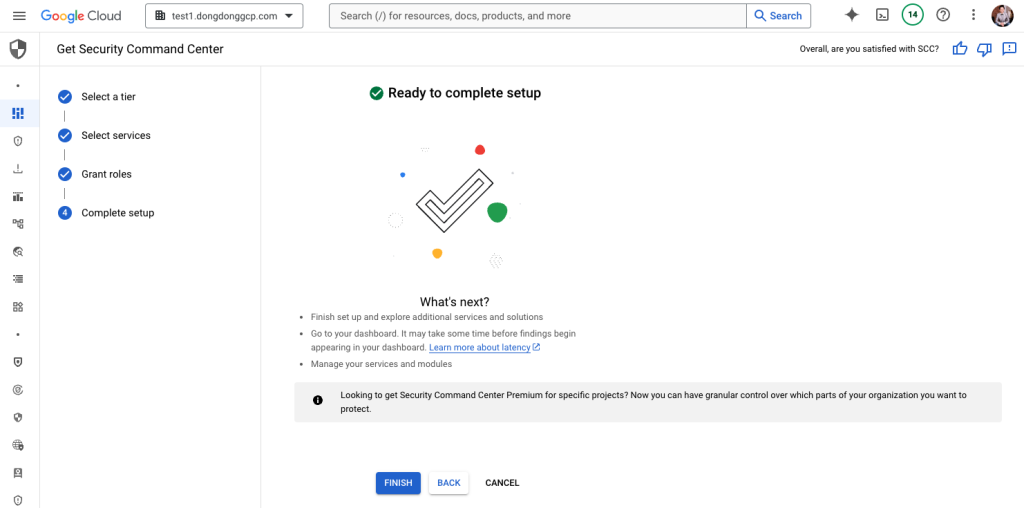
資料來源:擷圖自 GCP Console
這時候會進入 Risk Overview 的畫面,畫面往下捲,你會看到還需要啟動敏感資料保護的功能,它不屬於 SCC 的功能,必須額外啟用,我們先點擊 “ENABLE SENSITIVE DATA PROTECTION” 按鈕。
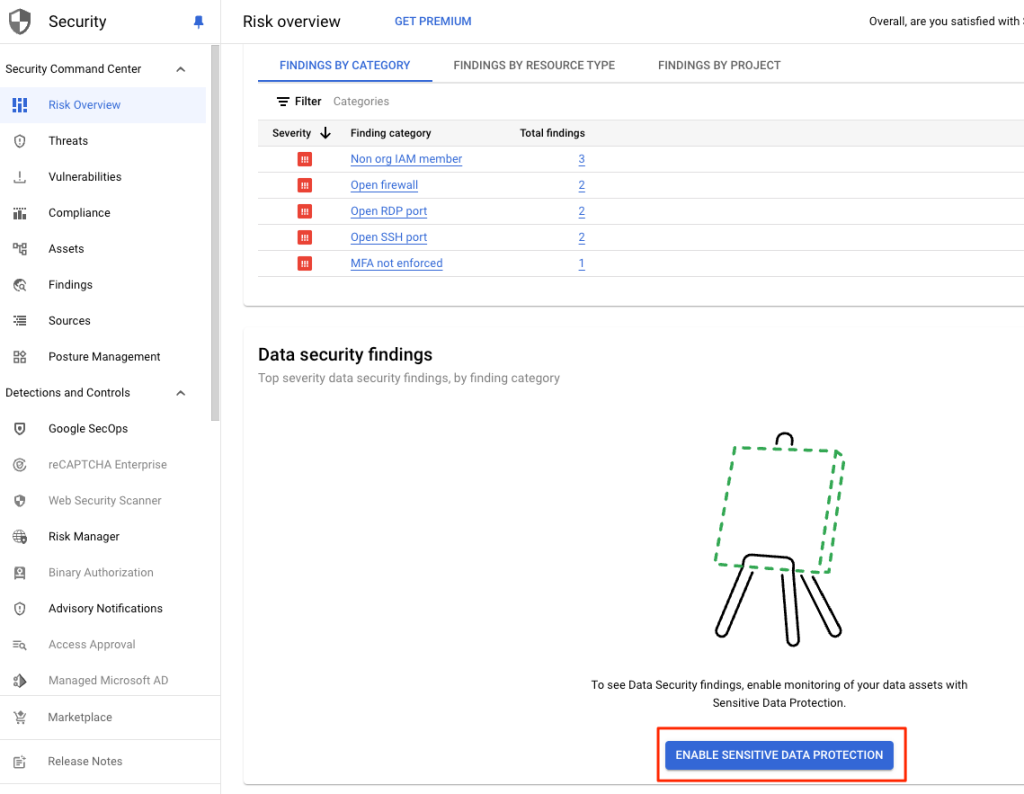
資料來源:擷圖自 GCP Console
接著它又會再彈出一個視窗,你要選擇手上其中一個的專案,讓 Service Agent Container 可以運作,並且授予相關權限,讓它可以收集資料。
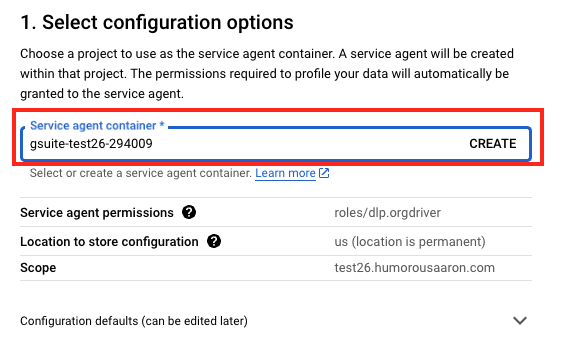
資料來源:擷圖自 GCP Console
而下方的 Enable Subscription 指的是 Data Profiles 的 Discovery 功能,能夠識別高風險資料都存在哪裡,告訴你哪些資料需要特別保護。這不屬於 SCC 本身的功能,但也能夠把檢查到的敏感資料總結到 Risk Management。
預設就是 Consumption Mode,代表用多少算多少,不管是 BigQuery、Cloud SQL、Cloud Storage 甚至 Amazon S3,每 GB 都是 0.03 美金。如果你選用 Subscription Mode,則是每月 2500 美金,除非你公司有超過 10000 個 Table 再來考慮,詳情可參考這份文件。
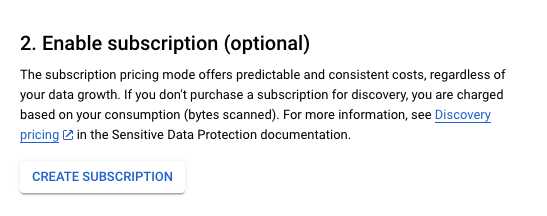
資料來源:擷圖自 GCP Console
接下來再針對你想要掃描的服務啟用 Discovery,例如我們只啟用 BigQuery。
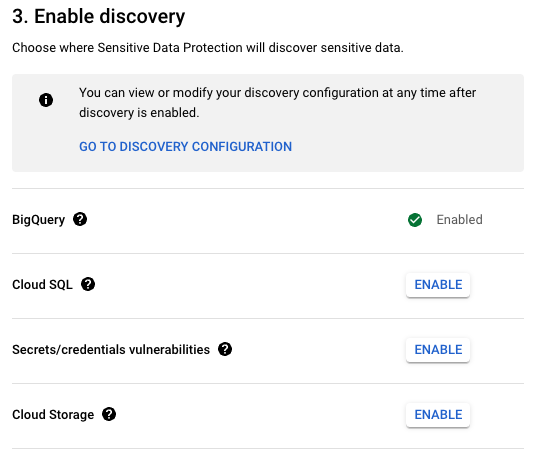
資料來源:擷圖自 GCP Console
當你啟用完成再按下一步,它會跳轉到 Sensitive Data Protection 的畫面,代表有啟用的服務,它才會幫你檢查敏感資料,沒啟用就檢查不到。如下圖 BigQuery 是有啟用 Discovery 的,Cloud SQL 和 Cloud Storage 則沒有。
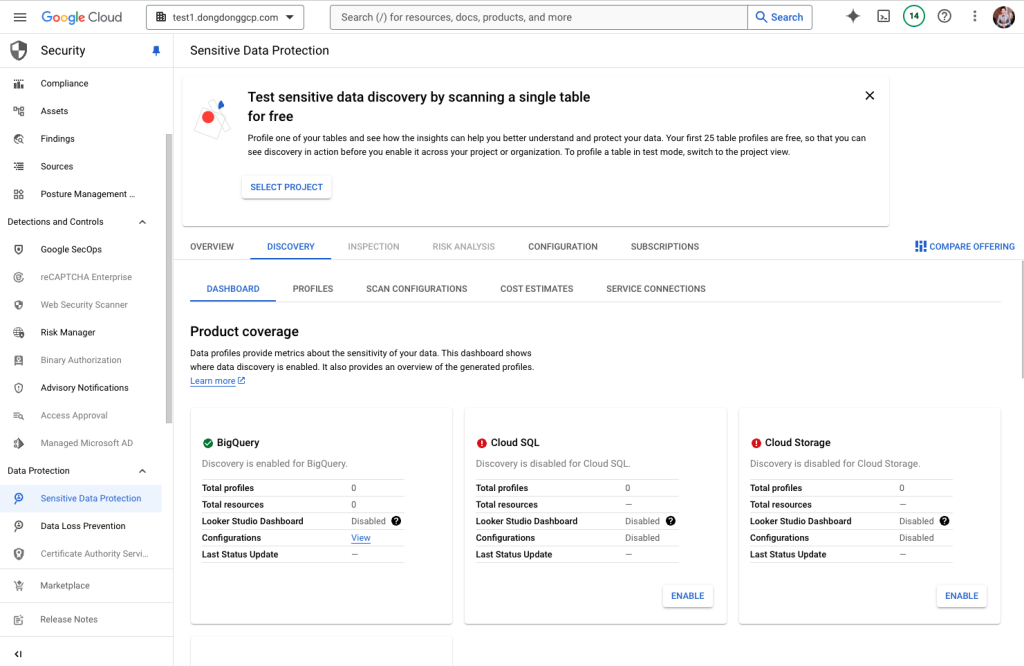
資料來源:擷圖自 GCP Console
再回到 SCC 的 Risk Overview 就能看到 Data Security Findings

資料來源:擷圖自 GCP Console
Security Command Center 版本比較整理
以下將 Security Command Center 三個版本當中,針對重要功能的差異整理如下表:
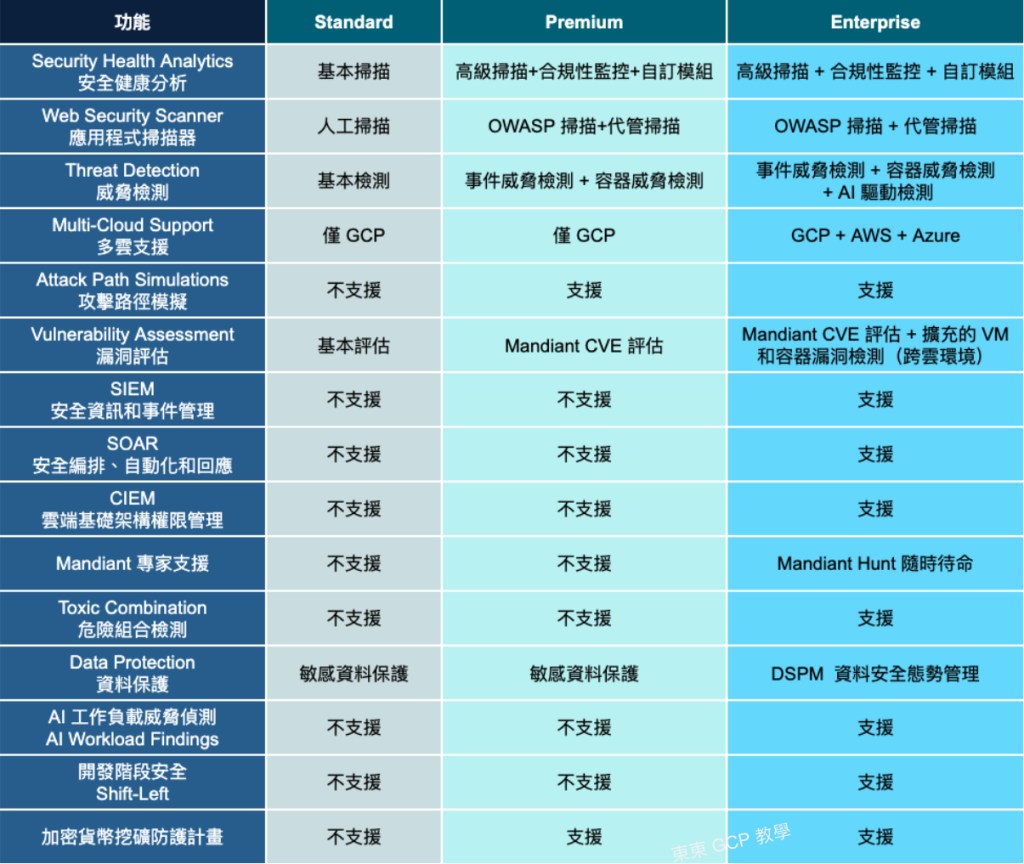
資料來源:東東老師自行整理
由此可知,SCC Standard 不同版本提供的差異很大,如果你是新創或中小企業,選擇 Standard 版本即可做到基本的資安防護;如果公司已經有些規模,並且重視資訊安全和合規,可以考慮 Premium 版本;如果已經是大企業,尤其是在多個公有雲,甚至跨國部署重要的系統,重視商譽和客戶,並且具備足夠預算的話,務必考慮 Enterprise 版本。如果需要完整的評估,可我們諮詢諮詢!
文章轉載自《東東GCP 教學》網站