

GA4 is now the default analytics language for modern marketing teams. It tracks users through events, connects web and app behaviour, and gives marketers a cleaner view of how customers move before they convert.
This guide explains what GA4 is, how GA4 events work, how GA4 traffic sources are classified, and why GA4 data becomes more valuable when enterprises connect it with a Customer Data Platform, or CDP.
- Why Is GA4 Now the New Standard for Marketing?
- What Is GA4?
- What Are GA4 Events?
- What Are GA4 Traffic Sources?
- How Can Marketing Teams Use GA4 Data Analytics?
- How Do Businesses Use GA4 in Practice?
- Why Is GA4 Website Data Not Enough?
- How Does a CDP Unlock More Value from GA4 Data?
- Frequently Asked Questions
- Take Action Now
Why Is GA4 Now the New Standard for Marketing?
Marketing teams do not need more dashboards. They need a clearer view of customer behaviour.
From luxury retail stores in Tsim Sha Tsui to e-commerce operators in Sham Shui Po, businesses now compete across websites, apps, search, social, email, and paid media. Universal Analytics, or UA, was built for a simpler web. GA4 was built for the customer journeys marketers deal with now.
When Google moved from UA to Google Analytics 4, the change was not just a platform upgrade. It forced marketers to rethink how they measure customers, campaigns, and conversion paths.
The common questions are practical:
- What is GA4?
- How is GA4 different from Universal Analytics?
- What customer signals can marketers read from GA4 events and traffic sources?
- Why is GA4 not enough on its own, and when does a CDP become useful?
What Is GA4?
GA4, or Google Analytics 4, is Google’s event-based analytics platform for websites and apps. It replaces the session-first logic of Universal Analytics with a user and event model.
That shift matters because customers no longer move in straight lines. A customer may discover a brand through organic search, compare products on mobile, return through Instagram, subscribe by email, and convert later through remarketing. GA4 gives teams a more flexible way to track those interactions across touchpoints.
Two market shifts shaped GA4:
- Customers move across websites and apps, not just one website.
- Privacy rules and browser changes have made third-party cookie tracking less reliable.
Instead of treating every visit as a separate session, GA4 records meaningful customer actions as events. A page view, scroll, outbound click, video play, add-to-cart action, lead form submission, and purchase can all become events.
That makes GA4 data analytics more useful for growth teams. Teams can analyse what people actually do, not just how many pages they load.
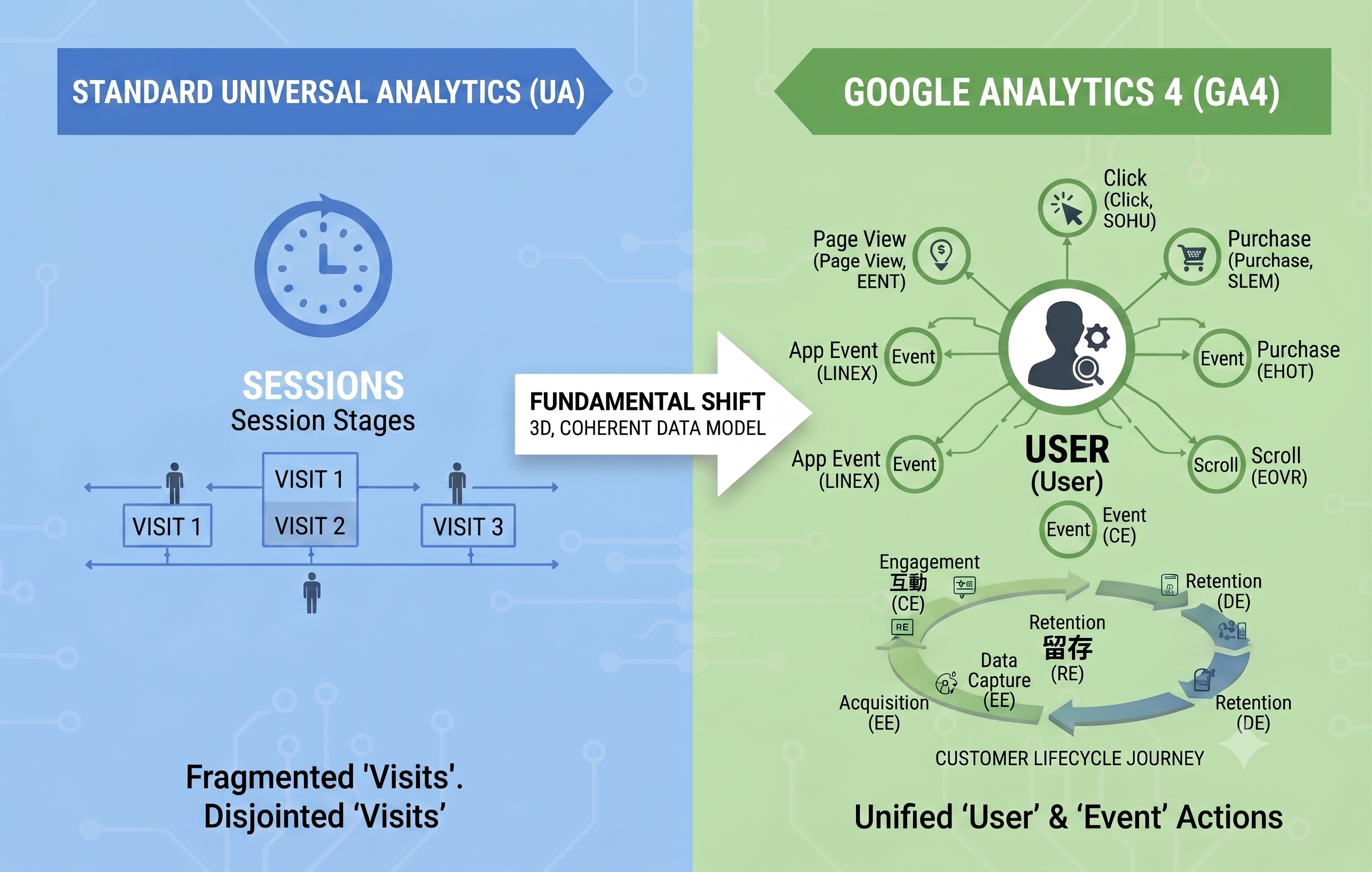
To make the shift from Universal Analytics to GA4 easier to understand, here’s a quick comparison of how the two platforms differ:
| Feature | Universal Analytics | Google Analytics 4 |
|---|---|---|
| Core model | Session-based | User and event-based |
| Data model | Built mainly around pageviews | Every meaningful interaction can be tracked as an event |
| Tracking scope | Website-first | Web and app tracking by design |
| Engagement metric | Bounce rate | Engagement rate |
| Data retention | Longer historical settings in UA | Standard GA4 properties use shorter user-level and event-level retention settings |
| Cross-device measurement | Harder to manage | Easier with Google Signals and identity features |
For brands, retailers, and B2B marketing teams, GA4 is the first step toward better customer visibility. It helps teams collect behavioural signals. It does not, by itself, create a complete customer intelligence system.
What Are GA4 Events?
GA4 events are the actions users take on your website or app. They form the core of GA4 measurement.
In Universal Analytics, marketers focused on pageviews, sessions, and bounce rate. Teams could track downloads, video plays, and form submissions, but those actions often needed separate event setup.
In GA4, events sit at the centre of the data model. Google classifies events into several types, including automatically collected events, enhanced measurement events, recommended events, and custom events.
Automatically Collected Events
Automatically collected events start tracking when you set up GA4 on a website or app. They capture basic behaviour without extra configuration.
Common examples include:
- session_start: triggered when a user starts a new session.
- first_visit: triggered when a user visits your website or app for the first time.
- user_engagement: triggered when a user actively engages with your site or app.
These events give marketers a base layer for GA4 data analytics.
Enhanced Measurement Events
Enhanced measurement lets GA4 collect more interaction data when the setting is enabled.
Useful enhanced measurement events include:
- Scrolls: triggered when a user reaches the bottom area of a page.
- Outbound clicks: triggered when a user clicks a link that leaves your domain.
- Site search: triggered when a user uses your website search function.
- Video engagement: triggered when a user starts, progresses through, or completes an embedded YouTube video.
- File downloads: triggered when a user downloads a file.
For many marketing sites, enhanced measurement gives teams faster access to useful behavioural signals without heavy engineering work.
Recommended Events
Recommended events use Google’s predefined event names and parameters. Google recommends them because they help standardise reporting and support more advanced use cases.
For e-commerce and lead generation, common recommended events include:
- add_to_cart
- begin_checkout
- purchase
- generate_lead
- sign_up
Marketing teams should use recommended events when the behaviour matches Google’s definitions. Clean naming makes reporting, conversion tracking, and future analysis easier.
Custom Events
Custom events track actions that matter to your business but do not fit standard GA4 event categories.
A real estate website, for example, may want to track when a user clicks “Book a property viewing.” The team could create a custom event such as book_a_visit.
A B2B SaaS company may track actions such as:
- book_demo_click
- pricing_page_view
- whitepaper_download
- solution_selecter_submit
Custom events help GA4 reflect your commercial model, not just generic website activity.
What Are GA4 Traffic Sources?
GA4 traffic sources show where users came from before they reached your website or app. Marketing teams use this data to evaluate channel performance and budget allocation.
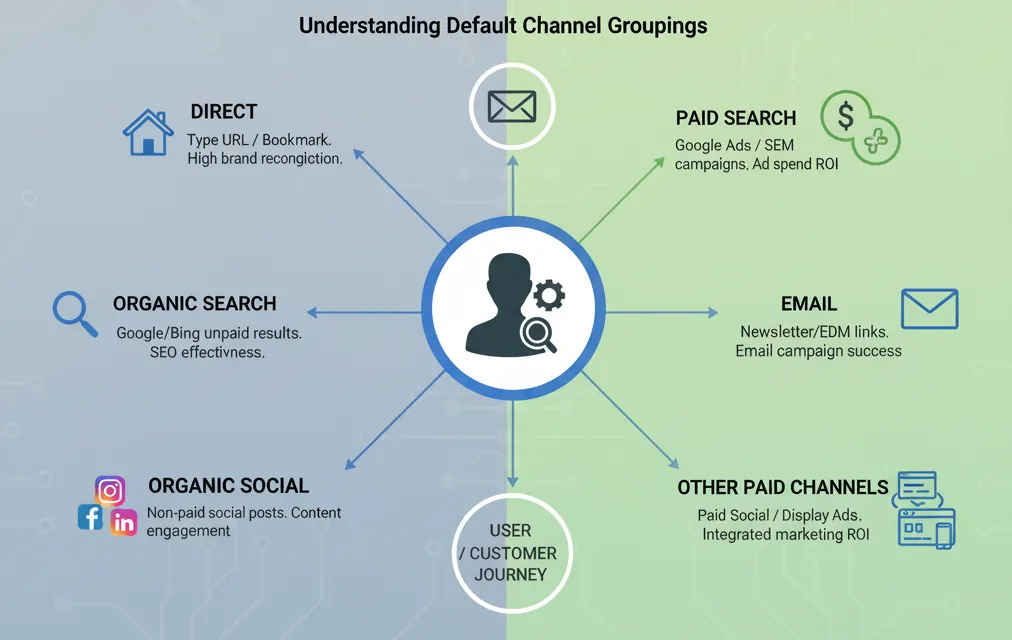
GA4 groups traffic through default channel groups. These groups classify traffic into categories such as Direct, Organic Search, Organic Social, Referral, Paid Search, Email, Paid Social, and Display.
Direct
Direct traffic appears when GA4 cannot identify a clear traffic source.
This can happen when a user types your URL into the browser, uses a bookmark, clicks an untagged link, or arrives from a source that does not pass referral data.
A high direct traffic share can signal brand awareness. It can also signal poor campaign tagging. Marketing teams should check both before drawing conclusions.
Organic Search
Organic Search includes unpaid visits from search engines such as Google and Bing.
This channel helps teams measure SEO performance. If organic search brings qualified visitors who engage and convert, content and technical SEO are working. If organic sessions rise but conversions stay flat, the team may be attracting the wrong intent.
Organic Social
Organic Social includes unpaid traffic from platforms such as Facebook, Instagram, LinkedIn, and other social networks.
For B2B brands, LinkedIn organic traffic can show whether thought leadership content drives buyers to deeper assets, such as reports, case studies, webinar pages, or solution pages.
Referral
Referral traffic comes from links on other websites, excluding major search engines and social networks.
A product review site, industry publication, partner directory, or event page may send referral traffic. This channel helps teams understand brand visibility beyond owned channels.
Paid Search
Paid Search includes traffic from search ads, such as Google Ads.
This channel helps teams evaluate SEM performance. Teams should review not only clicks and sessions, but also engaged sessions, key events, pipeline contribution, and conversion quality.
Email traffic comes from links in newsletters, nurture journeys, EDM campaigns, and lifecycle messages.
Clean UTM tagging matters here. Without consistent tagging, GA4 may misclassify email traffic as Direct or Referral, which weakens campaign reporting.
Other Paid Channels
Other paid channels include Paid Social, Display, and other ad-driven traffic sources.
GA4 separates these channels so marketers can compare cost, engagement, conversion rate, and customer quality across campaigns. This matters for integrated campaigns where one channel creates demand and another captures it.
How Can Marketing Teams Use GA4 Data Analytics?
GA4 becomes useful when teams turn reports into decisions.
Marketing teams should start with three areas: user behaviour, engagement, and conversion performance.
User Behaviour
Key user behaviour metrics include:
- New users: people who visit your site or app for the first time.
- Active users: users who engage with your site or app during a selected period.
- Returning users: users who come back after a previous interaction.
These metrics help teams understand reach, audience growth, and repeat interest.
Engagement
Key engagement metrics include:
- Average engagement time: how long users actively view and interact with your site or app.
- Engaged sessions: sessions that last longer than 10 seconds, include a conversion event, or include at least two pageviews or screen views.
- Engagement rate: the share of sessions that count as engaged sessions.
Engagement rate gives marketers a better signal than bounce rate alone. It shows whether visitors stay long enough to interact with content.
Conversion Performance
Key conversion metrics include:
- Key events or conversions: user actions that matter to the business, such as purchases, lead submissions, sign-ups, or demo requests.
- Conversion rate: the share of users or sessions that complete a valuable action.
GA4 Explorations help teams go beyond standard reports. Marketers can build funnel explorations to see where users drop from product views to cart, checkout, and purchase. They can also build path explorations to understand how users move between pages before they convert.
This is where GA4 data analytics becomes practical. It helps teams decide what to fix, which channel to scale, and which content deserves more investment.
How Do Businesses Use GA4 in Practice?
GA4 helps different businesses answer different questions. The value comes from matching the measurement plan to the business model.
E-Commerce Website
A local fashion e-commerce store can use GA4 events to track:
- view_item
- add_to_cart
- begin_checkout
- purchase
With a funnel exploration, the team can see how many users view a product, add it to cart, start checkout, and complete purchase.
If many users abandon after adding items to cart, the issue may sit in shipping fees, checkout friction, payment options, or trust signals. If traffic from Instagram ads drives high product views but weak purchases, the team may need better audience targeting or landing page alignment.
GA4 helps the team ask sharper questions. It does not replace commercial judgement.
Content Website
A content website that publishes local hiking routes can use enhanced measurement events to track scroll depth and video engagement.
If 90% of readers reach the bottom of an article about Sunset Peak and complete the embedded route video, the editorial team has a strong signal. Readers care about that topic and format.
The team can then produce more island routes, downloadable maps, or video-led guides. GA4 does not tell the team what to write. It shows which content behaviour deserves attention.
Why Is GA4 Website Data Not Enough?
GA4 is a strong analytics foundation. It is not a full customer intelligence system.
Two limitations matter for enterprise teams.
First, GA4 has data retention limits. Standard GA4 settings can limit user-level and event-level data retention. This creates issues for teams that need long-term customer lifetime value analysis, multi-year retention analysis, or advanced segmentation.
Second, GA4 still leaves teams with data silos. GA4 mainly records website and app behaviour. It does not automatically connect anonymous behavioural data with known customer records in CRM, offline POS, customer service platforms, marketing automation tools, or advertising platforms.
That gap matters. A high-intent anonymous visitor in GA4 may be a known customer in HubSpot, a segment in Braze, a support user in Intercom, or an app user tracked through AppsFlyer. If teams cannot connect those signals, they cannot personalise at scale.
How Does a CDP Unlock More Value from GA4 Data?
A CDP, or Customer Data Platform, helps teams connect GA4 behavioural signals with known customer data.
GA4 shows what happened on your website or app. A CDP helps teams decide what to do next.
With the right CDP setup, teams can:
- connect GA4 behavioural data with CRM records;
- unify web, app, email, WhatsApp, POS, and advertising data;
- build 360-degree customer profiles;
- create segments based on behaviour and customer value;
- trigger personalised journeys across tools such as HubSpot, Braze, Intercom, OneSignal, and Infobip;
- measure whether campaigns drive revenue, retention, and lifetime value.
This is where DAL’s Signal → Decide → Act → Learn methodology fits.
Signal: collect and unify customer data from GA4, CRM, apps, campaigns, and offline systems.
Decide: analyse behaviour, segment audiences, and identify next-best actions.
Act: activate personalised journeys across marketing, sales, and service channels.
Learn: test, measure, and optimise with tools such as Amplitude, VWO, HubSpot, and AppsFlyer.
GA4 gives teams the signal. A CDP turns that signal into customer intelligence.
DAL by Master Concept helps brands and enterprises connect GA4 data with Customer Data Platforms, CRM, marketing automation, experimentation, attribution, and analytics tools. The goal is simple: help teams turn customer behaviour into measurable business growth.
CTA: Book a 30-minute Customer Intelligence Assessment to review your GA4 setup, event taxonomy, traffic source tagging, and CDP readiness.
Frequently Asked Questions
What is GA4?
GA4, or Google Analytics 4, is Google’s event-based analytics platform for websites and apps. It tracks user actions such as page views, scrolls, clicks, downloads, form submissions, and purchases as events. GA4 replaced Universal Analytics and gives marketing teams a more flexible way to understand customer behaviour across digital touchpoints.
What are GA4 events?
GA4 events are user actions tracked on a website or app. Examples include page_view, scroll, click, add_to_cart, purchase, and generate_lead. GA4 includes automatically collected events, enhanced measurement events, recommended events, and custom events. A clean GA4 event structure helps teams analyse customer journeys and measure conversions.
What are GA4 traffic sources?
GA4 traffic sources show where users came from before visiting your website or app. Common channels include Direct, Organic Search, Organic Social, Referral, Paid Search, Email, Paid Social, and Display. Marketing teams use GA4 traffic source data to compare channel performance, improve campaign tagging, and decide where to invest budget.
Why is GA4 not enough for enterprise analytics?
GA4 mainly tracks website and app behaviour. It does not automatically unify that behaviour with CRM records, offline POS data, customer service history, marketing automation activity, or advertising data. Enterprises need a CDP to connect these signals, build 360-degree customer profiles, and activate personalised customer journeys.
How does a CDP work with GA4?
A CDP connects GA4 behavioural data with known customer data from CRM, apps, campaigns, and other systems. This helps teams identify high-intent users, build customer segments, trigger personalised messages, and measure revenue impact. For enterprise teams, GA4 collects signals while the CDP turns those signals into action.
GET IN TOUCH


![[Free Webinar] Road to COP17: Unifying Enterprise Data with Planetary-Scale Geospatial AI](https://masterconcept.ai/wp-content/uploads/2026/09/Webinar-261007-Unifying-Enterprise-Data-with-Planetary-Scale-Geospatial-AI-_1280x720px-scaled.png)